Implementing Schema Search on Snowflake
How to search multiple log sources at once
Security and observability data lakes have allowed customers to have access to more data than ever before and have given them the tools to search, analyze and report on it.
In previous generations there was less data, and less to do with it. So a common pattern emerged. When an incident responder, threat hunter or SRE wanted to search for something but they didn’t really know where it lived they had the ability to “search everywhere”. This ability is in theory incredibly useful. Just type in an IP or file hash and get everything.
As enterprises began collecting massive amounts of data they realized that the technologies they were using became unwieldy, restrictive and expensive. Cloud native scalable technologies like Snowflake have become more sought after and with that new patterns and approaches for querying data. However, no one likes to give up something they already have. The search everywhere paradigm, though long infeasible for anything even coming close to scale was still available and enterprises still want to know that they have that ability.
This article will provide an architectural reference to how to build this functionality in Snowflake, what tradeoffs to consider and a sample implementation for reference.
I didn’t say you couldn’t, I said you shouldn’t
The more data an analyst has access to the larger the cost in searching everywhere. One of the limiting factors of legacy architectures is that an everywhere search will be slow and probably time out if the scope is too large. Analysts adapted by a specific style of search, search everywhere, but for a short amount of time, expand until you find what you are looking for and then narrow down to more performant queries. You can think of this as an organic governor function.
Snowflake is a very powerful engine and so theoretically, you can just through a bunch of compute at a large inefficient search and it will complete in a reasonable amount of time. This means the natural governor that comes as a side effect from legacy architectures is removed. If you assume that analysts are more concerned with doing their job than writing efficient queries then it goes to follow that this pattern may be abused if left unchecked.
Snowflake already has performant and cost effective methods of querying logs. Log searches are made performant by taking advantage of Snowflake inherent optimizations, search optimization, top-k and full-text search. Look into these features, they may be all you need and even though it’s a learning curve, it’s not a steep one and queries that return faster for less cost are a benefit to everyone.
Some advice
- Use this pattern for searching small data sets or things restricted by time.
- For scheduled searches such as detections or reporting, don’t use this approach. This is more useful for ad-hoc queries, jobs that run often are worth the time to write performantly.
- If you’re just not sure where a given field lives, a better solution than searching everywhere is to implement a data governance solution. This could be a specialized tool, or just a spreadsheet. You can also take a look at Snowflake’s universal search to help find where the data you are looking for lives.
- Implementing a search everywhere function should be done with guardrails and restricted scope. Take advantage of one or more of the suggestions in the implementation section of this article.
Implementation
The approach this article takes is to build a custom function that can search multiple tables and return the results all at once. Take into account the following
Scope of search
In reality, it’s almost never a good idea to search literally “everywhere”. One of the main reasons that people build security data lakes is to break down their data silos. Not just between security tools but other enterprise data. Things like HR data, building access logs or internal customer support tickets may be useful in an investigation or to make a security program more effective but provide little value in an IOC Sweep. Different log sources may have different permissions as well, you may have automation that searches through internal employee emails but don’t want to give unrestricted access. Furthermore, as users create new tables, build ETL pipelines and write reports, there may be a fair amount of duplication (either copied or in views).
Restricting scope can help manage permission issues and ensure you’re only querying the data that is potentially needed. The function described here will restrict its scope to an individual schema and be executed with the rights of the caller. This is less likely to cause permission issues and allows an intuitive implementation network_logs.schema_search() to search network logs for instance.
Exposing an interface
How end users are going to be accessing the results of this type of search has a significant effect on what types of architectures and features you’ll be able to use.
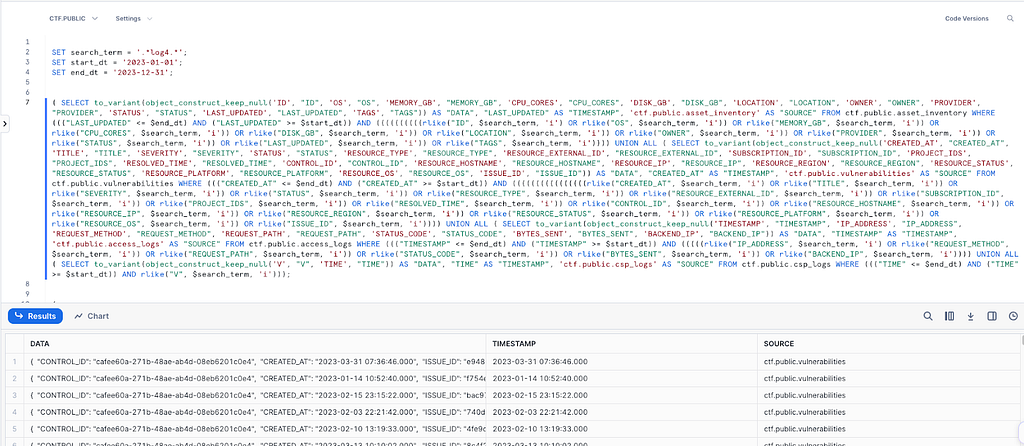
The simplest way to create this style search is to generate (dynamically) a long and unwieldy SQL statement, copy paste it into a worksheet and either find and replace or use variables. This is easy to deploy and gives flexibility. The main tradeoff being that it is hard to maintain, new columns will need to be manually added and dropped ones manually removed.
A streamlit application provides the most flexibility. You can guide your end users to whatever experience you want them to have and add non data related features like highlighting, guardrails and custom formatting logic.
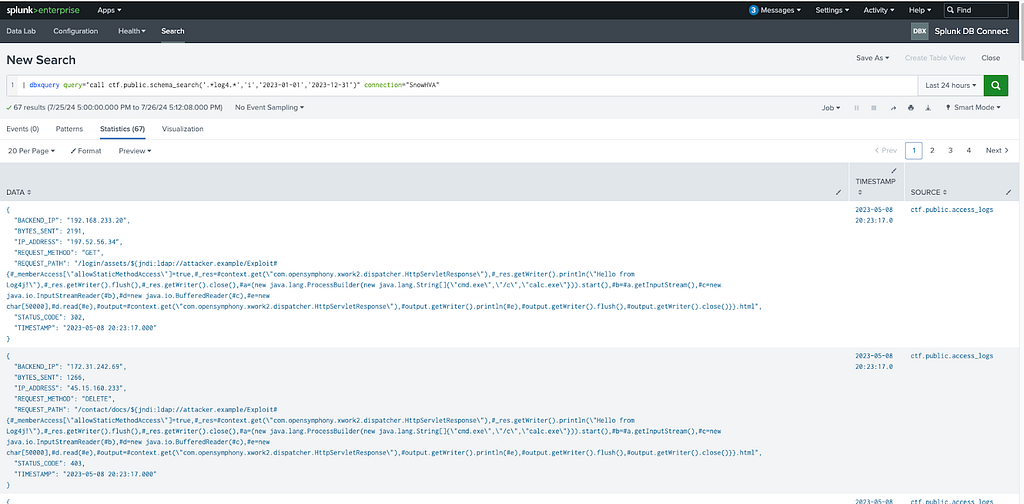
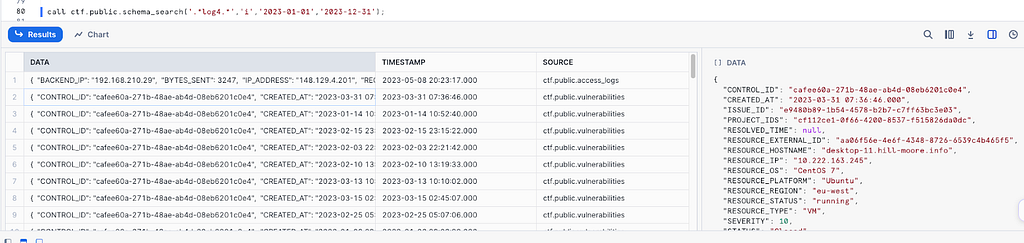
A stored procedure or function (using Snowpark) is likely the best bet for a lot of use cases and is shown below. Snowpark allows dynamic query building, you can deploy the function (or variants of it) in multiple schemas and it can be accessed in a variety of ways, either from Snowsight or even an ODBC/JDBC connection such as from Splunk using DBConnect.
Searching diverse table structures
Different tables can have different structures. Depending on your use case there are different ways to handle this. If you keep a uniform table structure with a certain set of tables (such as “raw” tables that have a variant and timestamp only) you can implement a function that unions everything together and returns matches. This pattern is not uncommon and also has the added benefit of allowing full text search and better filtering.
If this functionality is exposed through an interface such as Streamlit, independent searches can be aggregated together. This will have the added benefit of providing more control over usage, permissions and the end user experience.
For the sake of simplicity, this article assumes that the end user has tables in a variety of structures and so takes the approach of turning everything into a variant, then returning the log and its associated metadata.
Sanity checks and restricting compute
As mentioned above, giving unrestricted access to a function that searches everywhere can be an expensive endeavor. It pays to restrict what can be searched, for instance by enforcing a result limit, maximum timeframe or include other sanity checks, such as not including any filters.
A result limit may be applied for the entire search or per source. Implementing a results limit for the entire search will allow searches to complete faster, but may only return one source type. Implementing a limit per source, will trade performance for a wider range of results and is best used in tandem with a date range.
Limiting use to a specific warehouse (possibly through RBAC) can make this more manageable and enable a warehouse size cap, resource monitors and query timeouts.
You can also restrict functionality. The reference function showcases searching all tables with regular expressions. You may be inclined to limit this to a more efficient operation such as iLike.
Config
Filtering on what end users are searching is critical to both performance and ensuring relevance of results. The more you know about your data, the more you can be selective on what allowed values for what columns should be searched. At a minimum, this functionality should provide the ability to filter on timestamps and ensure that only the relevant sources are being searched.
This functionality can be implemented in a few ways. Metadata can be created and stored separately, either in a separate table, a config file or hard coded in the function itself. Accounts with an enterprise or higher plan can take advantage of tagging. Setting config can either be done manually or through a helper tool written in Streamlit or through a script.
The example below uses a hardcoded config object containing the relevant tables and timestamp columns.
An example
The following is an example of what a schema_search function may look like. This example:
- Is scoped to a single schema
- Uses a stored procedure as its interface, making it easy to call either from a worksheet or ODBC connection
- Runs as caller to prevent users from escalating privileges or needing to rely on this procedure as the only way to view certain datasets
- Hardcodes configuration
- Does not enforce restrictions but allows for limiting by result count (entire search) and timestamp. In this example guardrails could be enforced at the warehouse level or in the code.
- Uses Rlike to demonstrate regex search and provides functionality for regex parameters like case insensitive search
use database YOUR_DATABASE;

use schema YOUR_SCHEMA;

create or replace procedure schema_search(
        search_regex VARCHAR,
        regex_params VARCHAR default '',
        lim int default 0,
        min_timestamp VARCHAR default 'None',
        max_timestamp VARCHAR default 'None'

    )
    returns Table()
    language python
    runtime_version = 3.11
    packages =('snowflake-snowpark-python')
    handler = 'main'
    EXECUTE AS CALLER
    as '
import snowflake.snowpark as snowpark
from snowflake.snowpark.types import StructType, StructField, StringType
from snowflake.snowpark import Session
from snowflake.snowpark.functions import col, to_variant, struct,lit,call_builtin

config = [
{
      "table_name": "database.schema.table",
      "timestamp_column": "timestamp_column_name"
},
{
      "table_name": "database.schema.table",
      "timestamp_column": "timestamp_column_name"
}
]

def main(session: snowpark.Session,search_regex,regex_params,lim,min_timestamp,max_timestamp):
    if max_timestamp == "None":
          max_timestamp = None
    if min_timestamp == "None":
          min_timestamp = None
    if lim == 0:
        lim = None

    combined_df = None
    for config_item in config:
          table_name = config_item["table_name"]
          timestamp_column = config_item["timestamp_column"]
          table = session.table(table_name)
          if max_timestamp is not None:
                table = table.filter(col(timestamp_column) <= max_timestamp)
          if min_timestamp is not None:
                table = table.filter(col(timestamp_column) >= min_timestamp)

          # get columns for table
          columns = table.columns
          filter_chain = None
          for column in columns:
                if column == timestamp_column:
                      continue
                if filter_chain is None:
                      filter_chain = call_builtin("rlike", col(column), search_regex,regex_params )
                else:
                      filter_chain = filter_chain | (call_builtin("rlike", col(column), search_regex, regex_params))
          table = table.filter(filter_chain)
          df = table.select(to_variant(struct(*table.columns)).alias("data"),col(timestamp_column).alias("timestamp")).with_column("source", lit(table_name))

          if combined_df is None:
                combined_df = df
          else:
                combined_df = combined_df.union_all(df)
    return combined_df.limit(lim)';
The need to search massive amounts of data, have flexibility in their workloads and break down their data silos has and will continue to drive companies toward implementing security data lakes. Implementing familiar patterns such as an everywhere search can help drive adoption and minimize the inherent disruption associated with change.
To learn more about building cybersecurity data lake’s on Snowflake. Visit Snowflake’s cybersecurity portal or contact your account team.
This article originally appeared on Medium.