Snowflake Siem Integration Architectures
For IT and Security teams tasked with monitoring Snowflake, integration with a SIEM or other centralized monitoring solution is critical. This article goes over which logs are typically relevant, how to get them into your SIEM and where to find queries to help you get started monitoring.
Analyzing the relevant logs
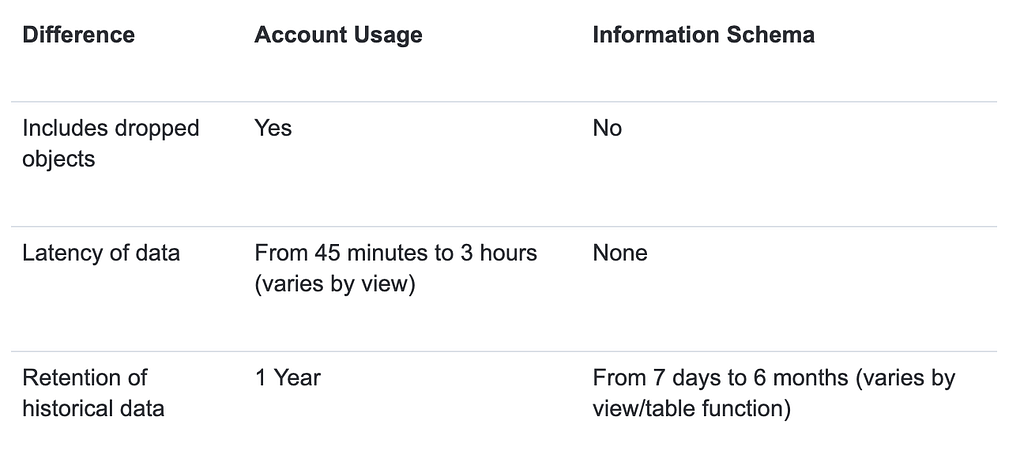
Logs in Snowflake are generally exposed via our SQL API as views. We provide two interfaces for viewing those logs. The account usage and information schema. Each interface will operate on different types of data at different latencies with a large amount of overlap. The Snowflake documentation lists the following as key differences.
For a comprehensive reference of security relevant log sources and associated MITRE mappings, Snowflake’s Applied Security Engineering has published a reference document as part of its Sentry project: https://snowflake-labs.github.io/Sentry/reference/log-sources.html
The Snowflake Sentry project is a framework to assist teams in monitoring and security their Snowflake footprint. More information on out of the box queries and their deployment methods will be found later in this article.
Getting data to your Siem.
Snowflake is capable of federating detection and/or analytics or exporting logs directly. Lets review the options:
Federating
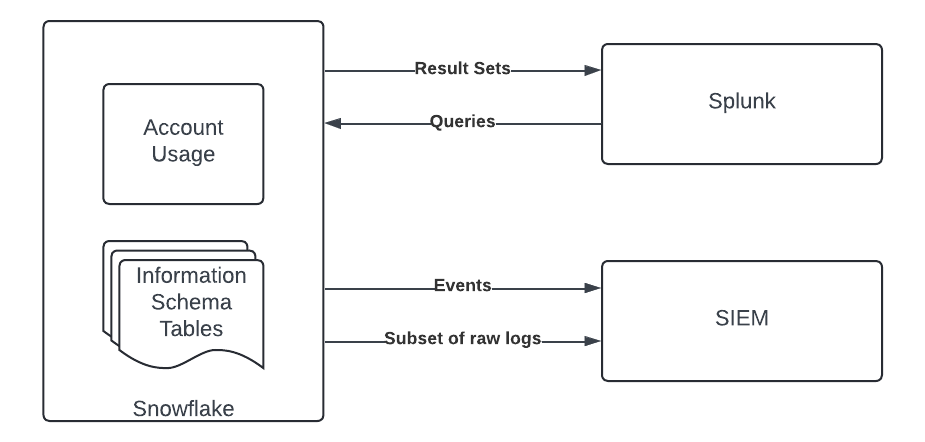
As a data platform Snowflake exposes audit logs though as a series of views. As such its possible to query the audit logs directly in Snowflake without needing to export to another analytics platform. This approach is appropriate for customers seeking improved latency and cost effectiveness from a traditional SIEM solution.
For detections, Snowflake customers may deploy their own queries in SQL, Python or other supported languages and schedule them as tasks or through the trust center. Snowflake provides out of the box monitoring queries (see below), the results then can be exported into a SIEM for further alerting or triage. This approach avoids the need to move the entirety of Snowflake’s audit logs into a SIEM.
Events may be exported via an external stage as described above or given their minimal bandwidth on a scheduled or triggered basis to a REST api using external access or external functions as illustrated in this guide.
For Splunk customers, Snowflake provides a plugin that allows Splunk to reach into Snowflake through our JDBC driver. Splunk may then be used to view audit logs, read results of detections or import logs on an adhoc basis. This functionality applies to both audit logs as well as other sources and many customers use this architecture to offload other verbose log sources such as EDR and network logs. More information about Splunk Augmentation can be found here.
Exporting
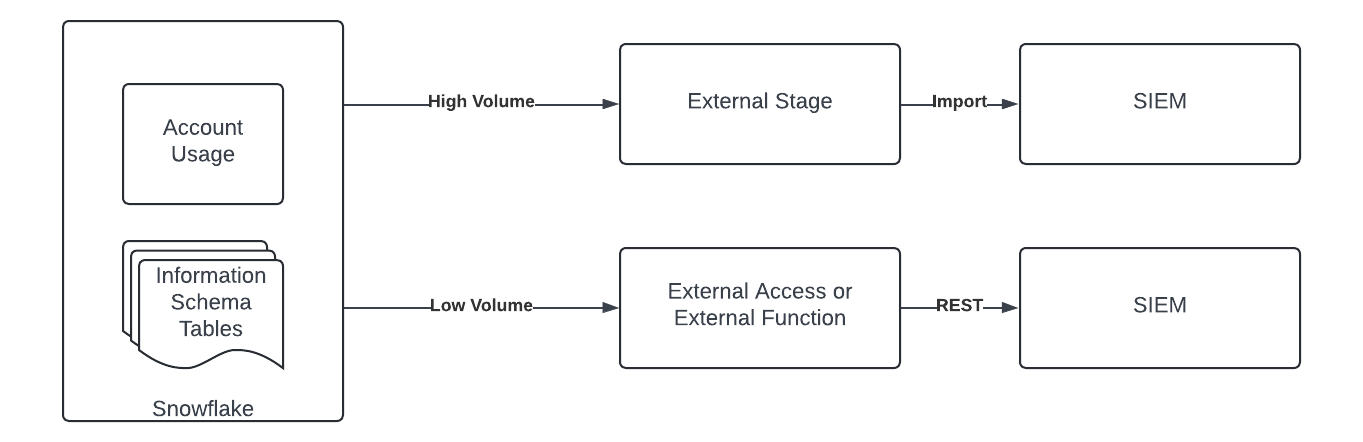
Exporting logs from Snowflake is the most straightforward way to integrate with a siem and is similar to how a security team typically interacts with a SaaS or IaaS platform. As such it fits into existing processes and will provide a secondary backup of all audit logs into Snowflake. The main tradeoff of this approach is cost, while Snowflake does not charge for access to audit logs, Siem vendors will charge for their ingestion and storage. For active Snowflake organizations these logs can have a high cardinality and may incur large ingest costs. If using this approach therefore it’s critical to choose the logs you need at the latency required.
Logs in this scenario will generally be transferred via export functionality to an external stage such as S3. From there logs can be ingested into your SIEM. Using the method describe above, Splunk may be configured to reach in to pull security and other raw logs directly from Snowflake as well.
Prepared Queries and Detections
Snowflake provides several strategies and accelerators for customers looking to monitor their accounts. To review a few
Trust Center
Trust Center is a native Snowflake feature that automates posture management through scanner packages. Customers may enable scanners directly through trust center and schedule them at times of their choosing. Once enabled, reporting is conducted through the UI or by querying the “snowflake/trust_center/findings” view
Sentry
Sentry is a project maintained by the Security Applied Field Engineering (SAFE) team at Snowflake. It is a framework for monitoring Snowflake, consists of many commonly used monitoring queries and has several different options for deployment such as through Streamlit interface or as stored procedures. Documentation on the project, its queries and its deployment can be found here
By providing a variety of SIEM integration options, customers are able to choose the approach that best meets their needs in terms of latency, cost, and desired functionality. By utilizing Snowflake’s export functionality, federated queries, or the Splunk plugin, customers can effectively monitor Snowflake activity and ensure the security of their data. To learn more about security analytics on Snowflake visit the Snowflake for Cybersecurity page.
This article originally appeared on Medium.